Satelit for Windows
In short
Satelit for Windows is the Satelit app in its own window on your PC, with a menu in the system tray, hotkeys for Satelit AI, waking to “Satelit” and widgets. It can let Satelit AI use the PC when you ask from your phone, only after you link it to your account and approve each new device on the PC. In Microsoft Store it still carries the “Coming soon” label.
What is Satelit for Windows?
Satelit for Windows is the Satelit app on your computer, in its own window, with things only a PC can do. The window opens the same app as app.satelit.md, so the account, budgets, lists and the assistant are the same. The app updates itself along with the site.
Besides the window, the app adds:
- a menu in the system tray, next to the clock;
- hotkeys for Satelit AI: Win+J for chat, Win+Shift+J for voice;
- waking to the word “Satelit”, recognised on the PC;
- the Home page widgets on the Windows Widgets board;
- control of the PC from your phone, through Satelit AI, only if you turn it on.
How do I get the app?
On the satelit.md apps page, Windows still carries the label “Coming soon to Microsoft Store”. The link appears there on the day the store publishes the app.
Until then:
- Open app.satelit.md in Microsoft Edge or in Chrome.
- Sign in to your Satelit account.
- From the browser menu, choose to install it as an app. Satelit appears in the Start menu, in its own window.
What is in the system tray?
When you close the window, Satelit stays in the system tray. A right-click on the icon opens the menu.
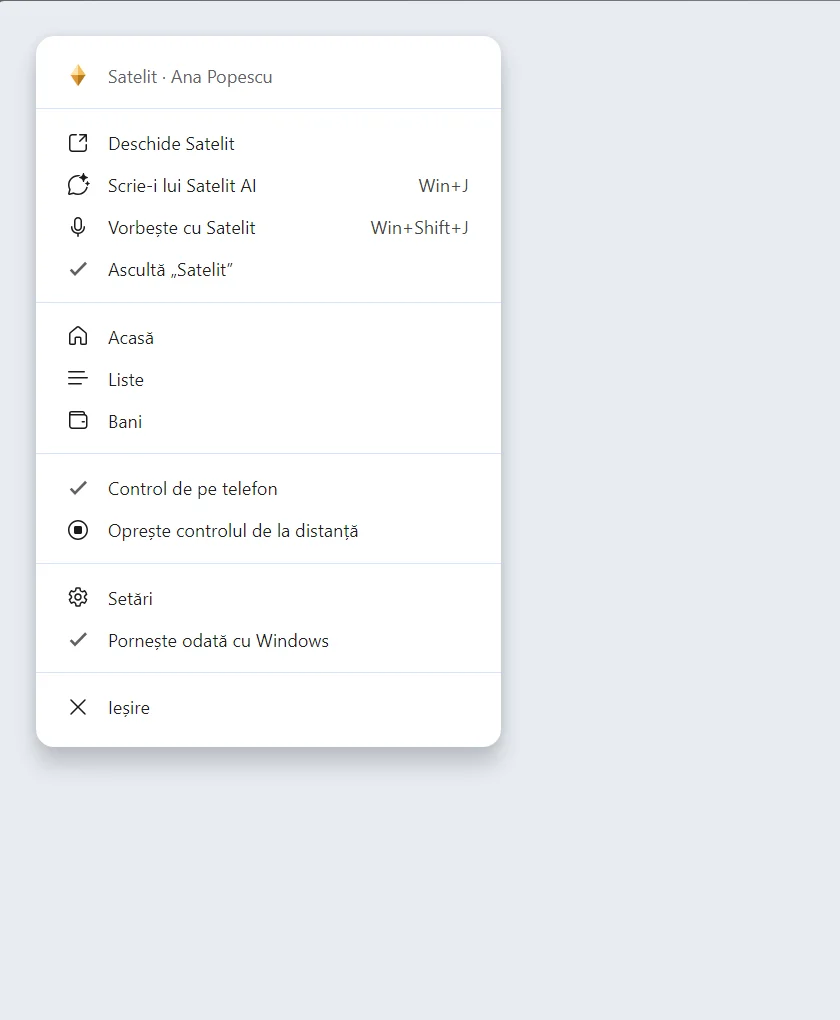
From the menu:
- Open Satelit brings the window back.
- Chat with Satelit AI (Win+J) and Talk to Satelit (Win+Shift+J) open the assistant without the large window.
- Listen for “Satelit” turns waking to the name on or off.
- Home, Lists, Money open those pages directly.
- Start with Windows starts Satelit in the system tray, without a window, when you sign in to Windows.
- Quit closes the app completely. Ctrl+Q also works.
You change the hotkeys in the app's settings, under “Assistant”. Windows does not allow every combination; if it refuses one, the app tells you.
How do I turn on waking to “Satelit”?
Waking to the name opens the voice without a key: you say “Satelit” and the question.
- Open the menu in the system tray.
- Tick Listen for “Satelit”.
- Say “Satelit”. A small window opens above the system tray, where Satelit listens to you and answers.
Waking is off until you turn it on. While it waits for the name, no sound leaves the PC: only the name opens the voice. The microphone light in Windows shows when it is listening.
How do I let Satelit AI use my PC from my phone?
Remote control means that Satelit AI does on the PC what you ask from your phone: it sends you a screenshot, opens an app, changes the volume, locks the PC.
- Sign in to Satelit for Windows. The app links the PC to your account by itself.
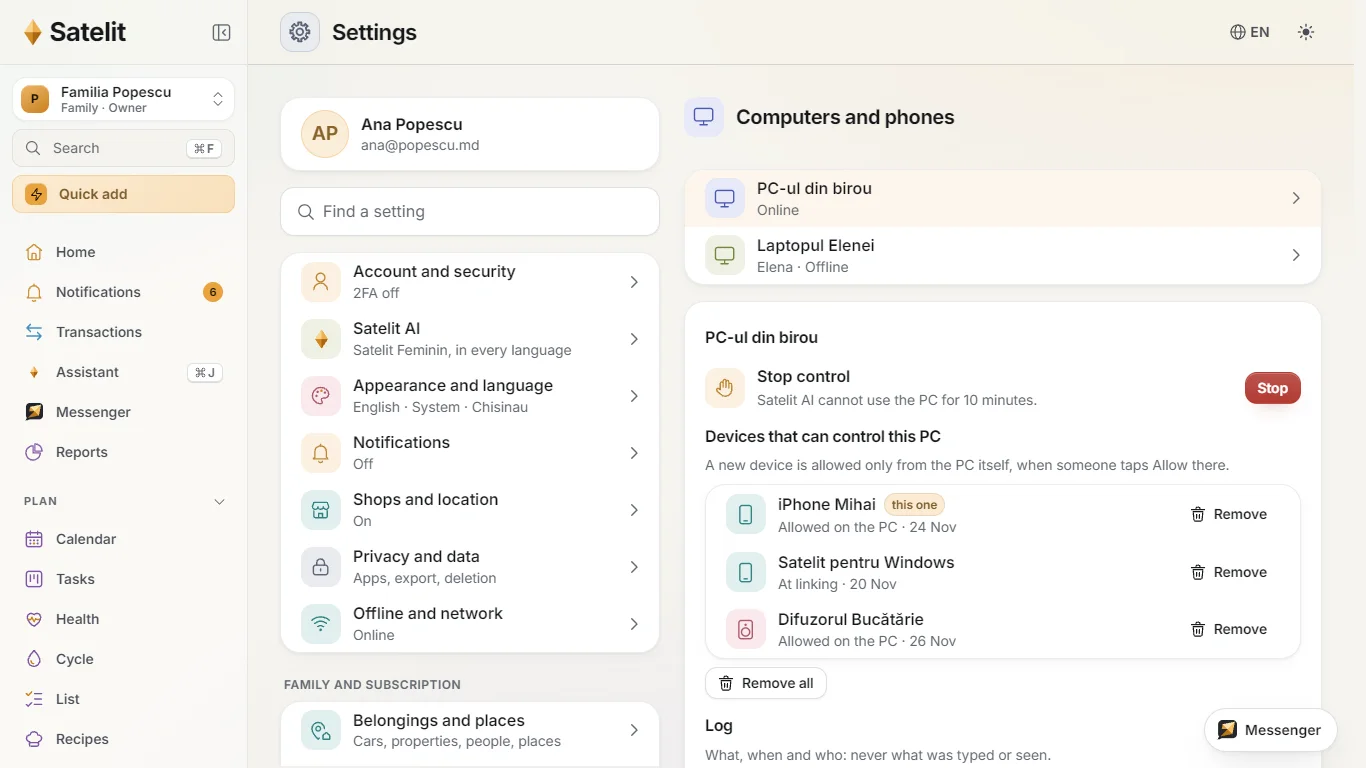
- Open Settings → Computer and give it a name under “PC name”. That is what Satelit AI calls it: “Lock the office PC”.
- Turn on Control from the phone.
- On your phone, tell Satelit AI what you want it to do on the PC.
- On the first request from a new device, the PC shows “Allow control of this PC from …?”. Click Allow on the PC.
Restarting, shutting down and closing apps need confirmation. Before a restart or shutdown, the PC shows a message with Cancel for 30 seconds, so the person at the PC can stop the request.
How am I protected during remote control?
Control is limited to what you approve on the PC and is visible every time.
- Each new device is approved on the PC. A stolen password, on a new phone, does not reach the PC until someone clicks Allow there.
- Every control is visible. While it acts, the PC shows who is controlling it.
- Stopping is at hand. “Stop control” leaves the PC without control for 10 minutes.
- The log shows what, when and who, never what was typed or seen.
- Nothing else opens the PC. The app only asks the server; it opens no port to the internet.
You see and remove the approved devices under “Devices that can control this PC”. “Remove all” makes each of them ask for Allow again.
Can I let the family admins control my PC?
Yes, if you turn on “Family admins can control this PC”. The option is off by default and only the PC's owner can change it. Admins use the PC through Satelit AI as you do, and the PC shows who is controlling it. On a computer other than your PC, the same list appears in Settings → “Computers and phones”.
If something goes wrong
The Win+J key does not open Satelit AI
Another app may already use the combination, or Windows did not allow it. Open the app's settings, under “Assistant”, click “Change” and choose another combination of Ctrl, Alt, Shift or Win with a letter, a digit, an F key or Space.
Satelit does not start with Windows
Start-up may be turned off in the Windows settings. Open Windows Settings → Apps → Startup and turn Satelit on there.
The phone says the PC did not answer
The PC must be on, connected to the internet and with Satelit open, at least in the system tray. Also check that “Control from the phone” is ticked and that you have not stopped control for 10 minutes.
The request from a new phone was refused
If nobody clicked Allow on the PC within 60 seconds, the request is refused. Ask again from the phone and click Allow on the PC.
Frequently asked questions
Where do I download Satelit for Windows?
The app is not yet published in Microsoft Store, and the satelit.md apps page says “Coming soon to Microsoft Store”. Until then, you open app.satelit.md in Edge or Chrome and install Satelit as an app from the browser.
Can someone control my PC if they find out my password?
Not without someone at the PC. A new device is allowed only from the PC itself, when someone clicks Allow there; with no answer within 60 seconds, the request is refused.
How do I stop remote control?
From the menu in the system tray, choose to stop control, or click “Stop control” in the settings. Satelit AI will not be able to use the PC for 10 minutes.
Is the PC listening to me all the time?
Waking to “Satelit” is off until you turn it on. While it waits for the name, nothing leaves the PC; only the name opens the voice.
What does Satelit see in the control log?
The log shows what, when and who, never what was typed or seen. You find it in the PC's settings, under “Control and log”.
Do I get message notifications twice if I also have Messenger Satelit?
No. When Messenger Satelit is installed on the PC, only Messenger gives notifications for messages and calls.
Read next
- Satelit AI: the assistant and voiceWhat Satelit AI can do with the family's money, lists and prices, how you talk to it, what needs your confirmation and how plan tokens are used.
- Widgets and complicationsHow to add Satelit widgets on iPhone, iPad, Android, Mac and Windows and complications on Apple Watch, what each shows and how amounts stay hidden.
- Satelit for MacWhat Satelit for Mac does: the menu bar, the Satelit AI panel with ⌥⌘S, urgent alerts above every window, widgets and keyboard shortcuts.
- The web app app.satelit.mdHow to use Satelit in the browser at app.satelit.md, how to install it on your phone's or computer's home screen and how it updates itself.