Satelit without internet
In short
Satelit also works without internet once you have opened it online: you see the screens you opened, add expenses, check off lists and listen to kept songs. What you change is saved on the device and goes to the server by itself when the network is back. Only Satelit AI and a few account actions need internet.
What works in Satelit without internet?
Satelit opens and works without internet once you have opened it online on that device. The app keeps its files and a copy of your data in the device's storage.
| What | Without internet |
|---|---|
| The app (screens, fonts, icons) | Opens normally. |
| Transactions, lists, meals, plans, events, recipes, wallets and recurring payments | You see them and can change them. Changes wait for the network. |
| Any other screen opened once (prices, discounts, products, reports, weather, news) | You see the latest kept version, with its age. |
| Downloaded films | Can be watched. |
| Songs you listened to | Play, if they were kept in full. |
| Satelit AI | Does not work: “Satelit AI needs the internet.” |
In Settings → Offline and network you find the same list, under What works offline.
What happens to what I add offline?
Everything you add or change without internet is first saved on the device, in a queue of changes. When the network is back, the app sends them to the server by itself, in the order you made them.
- You add, for example, an expense of 125.00 MDL or check off “White bread” on the list.
- The change appears on screen at once and stays on the device.
- On a computer, in the side menu, you see “Offline” or the number of changes waiting.
- When the network is back, the changes go to the server by themselves. You do not need to tap anything.
- The other family members see the changes once they have reached the server.
If someone changed the same thing in the meantime, the most recently saved version is kept. In that case you see the message: “The change was not saved: someone changed this more recently or your rights do not allow it. We kept the saved version.”
What does not work without internet?
Some actions need the server and are not queued. For them you see “This needs an internet connection.”
- Satelit AI: the assistant's box says “Satelit AI needs the internet.”, sending is off and the voice button is hidden;
- exporting data and deleting the account;
- signing in, changing the password and the ways you sign in;
- looking up new prices and screens you have never opened.
How do I know the app is offline?
Satelit considers you offline only after it checks twice, at least 5 seconds apart. A single lost request is not enough. That way you do not see false alarms when the network drops for a moment.
- Online, you see nothing.
- 3 seconds after the missing connection is confirmed, a small label appears in the screen's header. It does not cover or move anything.
- When tapped, the label says: “No connection. What you add is saved and goes out on its own when the network is back.”
- When the network is back, the label disappears and you see “Connected again” for 2 seconds.
While you are offline, the app checks again after 3, 6, 12, 24 and then every 30 seconds. In Settings → Offline and network you can tap Check at any time.
What do I see in Settings → Offline and network?
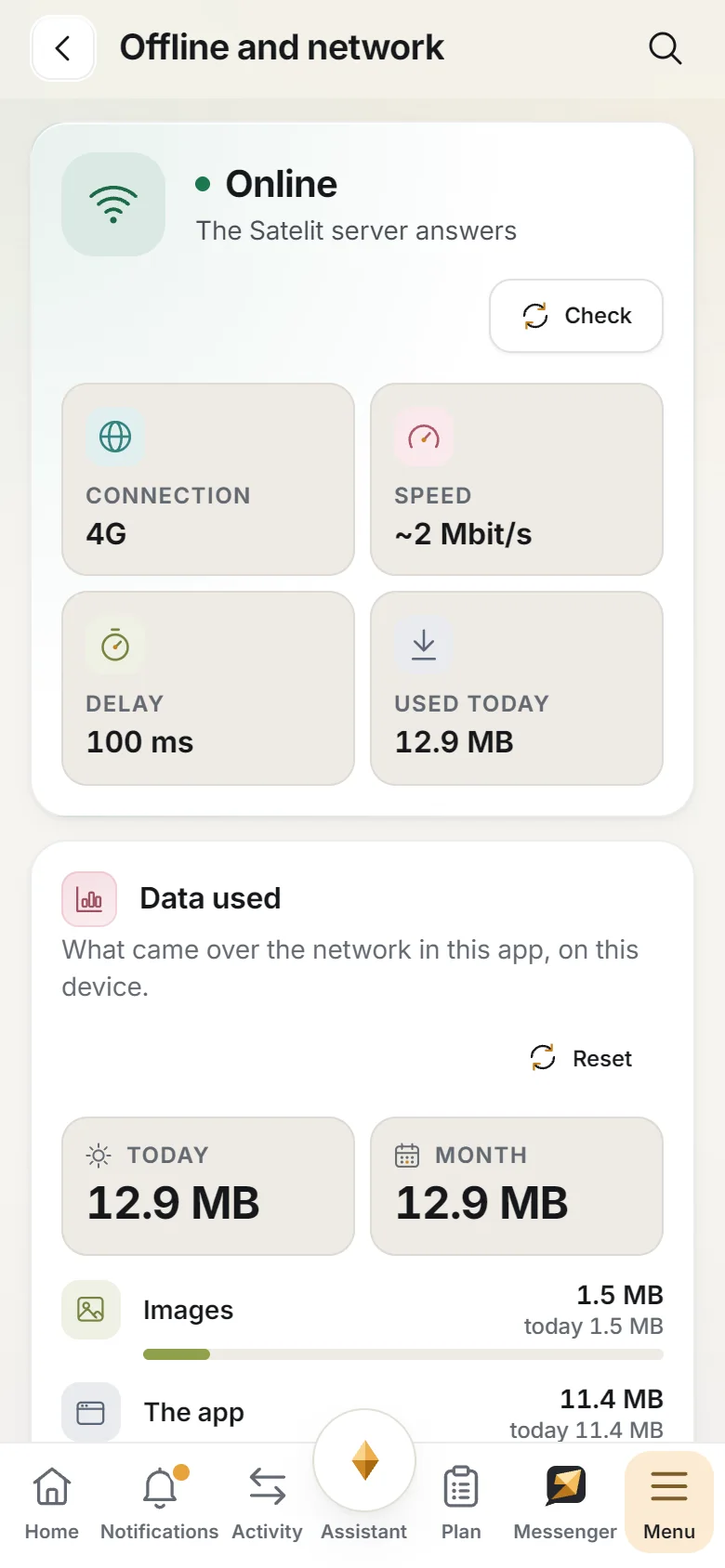
The section shows the connection status and what the app keeps on the device.
- Internet now: online or offline, and whether the Satelit server responds;
- Connection, Speed and Delay, where the browser reports them (Chrome, Edge, Android);
- Data used: what came over the network today and in the current month, by type: data, music and films, images, the app;
- On this device: Kept screens, Kept songs, Downloaded films, with their size, and how much of the space given by the browser is used;
- Keep data permanently: asks the browser not to delete the data when it needs space.
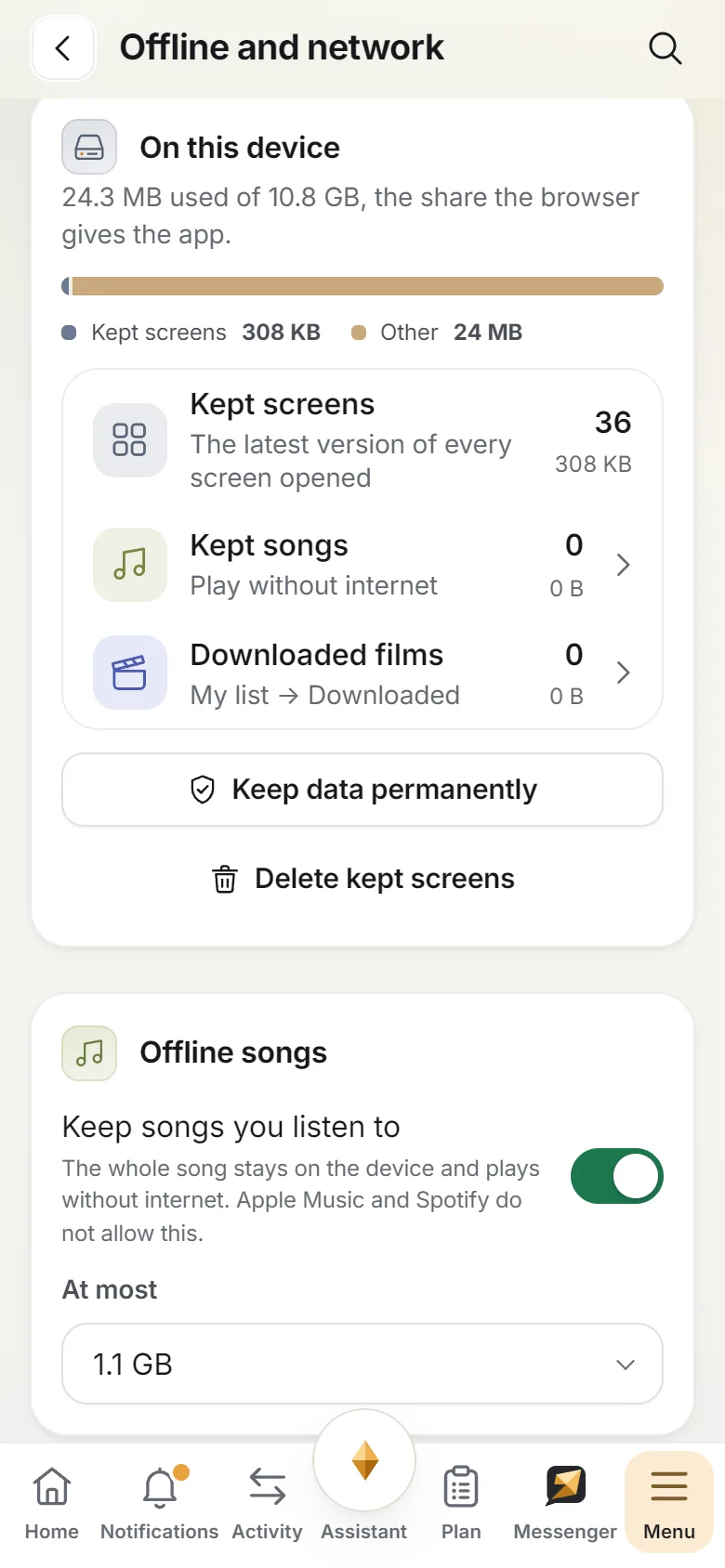
Songs are kept only if Keep songs you listen to is on, and they are not kept while the system's data saver is on. Apple Music and Spotify do not allow their songs to be kept.
What stays on the device after I sign out?
Nothing from the account. On Sign out, Satelit deletes the data saved offline, the queue of changes, the cached files and the notifications from the device. Only the theme and the language stay. The app never caches the server's private answers, and messages, sessions and invites are not kept offline.
If something goes wrong
The app does not open without internet
Open it once with internet on that device and wait for it to load completely. The app in Telegram needs the Telegram network to start; use the app in the browser or the one installed on the home screen.
A screen appears empty offline
The screen was not opened online on this device in the last 30 days. Open it once with internet.
My changes do not appear for the others
They go out only when your device has a network again. Open the app online and wait a few seconds. Do not sign out before that: signing out also deletes unsent changes.
I got the message that my change was not saved
Someone else changed the same thing more recently, or your role does not allow the change. Check the kept version and make the change again, if needed.
The app says I am offline, although I have Wi-Fi
A Wi-Fi network without internet access or with a sign-in page looks like a network without internet. Open a website in the browser, then tap Check in Settings → Offline and network.
Frequently asked questions
Are expenses added without internet lost?
No. They are saved on the device and go to the server by themselves when the network is back. Do not sign out before they are sent.
Does the Satelit AI assistant work without internet?
No. Satelit AI needs internet: without a network, the send button is off and the box says “Satelit AI needs the internet.”
How do I see that the app is offline?
A small label appears in the screen's header after a few seconds without a connection. When the network is back, you see “Connected again” for 2 seconds.
What happens if someone in the family changed the same thing in the meantime?
The most recently saved version is kept, and the app tells you that your change was not saved.
How long does the app keep opened screens?
Up to 30 days, the latest version of each opened screen. Online, the screen updates itself with the new data.
Does the app in Telegram work offline too?
Not in the same way: Telegram needs a network to start the app. The web app in the browser or installed on the home screen starts without a network too.
Read next
- The web app app.satelit.mdHow to use Satelit in the browser at app.satelit.md, how to install it on your phone's or computer's home screen and how it updates itself.
- Privacy and securityHow Satelit protects shop passwords, requests between the app and the server, and your account: who sees what in the family, devices, 2FA, passkeys.
- Getting started with SatelitWhat Satelit is, how to create an account, sign in with email, Google, Apple, Facebook, Telegram or a passkey, and what to do after you first sign in.