Satelit for Mac
In short
Satelit for Mac is the Satelit app in a native macOS window, with an icon in the menu bar. It adds the Satelit AI panel opened with ⌥⌘S, urgent alerts at full volume and widgets. It works on macOS 13 Ventura and newer, on Macs with Apple silicon and with Intel.
What is Satelit for Mac?
Satelit for Mac is the Satelit app in a native macOS window. The screens are the same as on app.satelit.md, and a change made on the web also appears on the Mac without a new version. The app adds what makes sense on a Mac: the menu bar, the Satelit AI panel, urgent alerts on every screen, widgets, menus and keyboard shortcuts.
It works on macOS 13 Ventura and newer. On satelit.md, Satelit for Mac carries the label “Coming soon to Mac App Store”.
How do you sign in on a Mac?
You sign in with your password, a passkey or a code directly in the app window. For Google, Apple, Facebook or Telegram, Satelit opens the Mac's browser, because these providers do not allow signing in from another app. The confirmation page says “Satelit for Mac”. After you confirm, you return to the app.
What is in the menu bar?
The Satelit icon in the menu bar opens a menu with:
- the account status;
- Talk (⌥⌘S) and Open Satelit;
- the last five notifications; a click opens their place;
- Home, Assistant, Lists, Money;
- Settings…, Check the Alert, Permissions… and Quit Satelit.
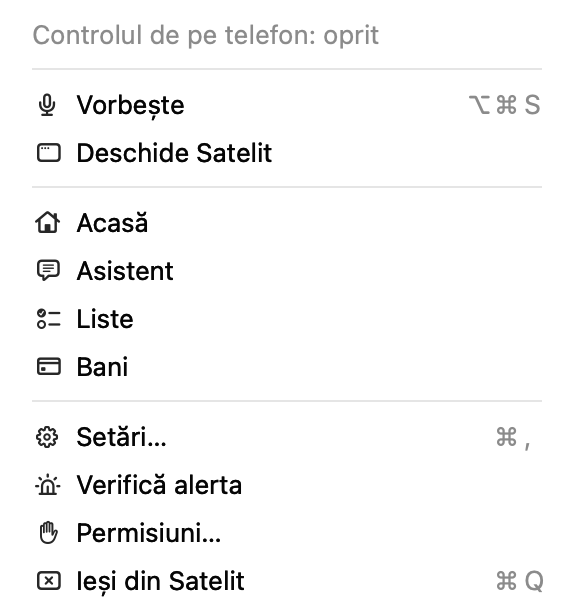
When you close the last window, Satelit does not quit. It stays in the menu bar, and notifications and alerts keep coming. A click on the Dock icon shows the window again. To quit the app, press ⌘Q.
Which keyboard shortcuts does it have?
- ⌘1 Home, ⌘2 Assistant, ⌘3 Lists, ⌘4 Money, ⌘5 Settings.
- ⌘N opens a new window, ⌘T a new tab.
- ⌘[ and ⌘] go back and forward.
- ⌥⌘S starts Satelit AI listening, ⌥⌘J opens it for typing.
The Dock menu has the same places: Home, Assistant, Lists, Money, Settings and Talk.
How do you use Satelit AI on a Mac?
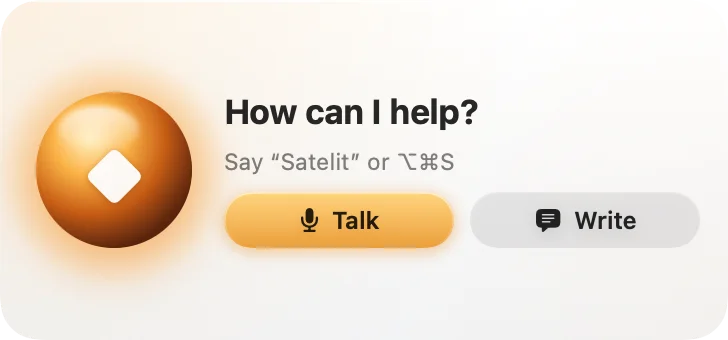
Satelit AI has its own panel, above every window, below the right corner of the menu bar. The steps are in the guide above.
If you turn on listening for the word “Satelit”, the panel also appears when you say “Satelit”. Listening works without internet, on the Mac, and pauses while another app is recording or holding a call. It also stops when the battery drops below 20 %. The microphone is requested only the first time you use your voice, not at start-up.
From the Shortcuts app you have “Ask Satelit”, “Add to the list” and “Open Satelit”. The Services menu sends the selected text to Satelit AI.
How do urgent alerts arrive on a Mac?
Earthquakes, drones, war risk, smoke and water leaks at home arrive as urgent notifications. They get past Focus, unless you have turned off urgent notifications for Satelit.
On an alert, Satelit:
- raises the audio output volume to the maximum and puts it back after the alert;
- plays the siren sound, for at most 60 seconds;
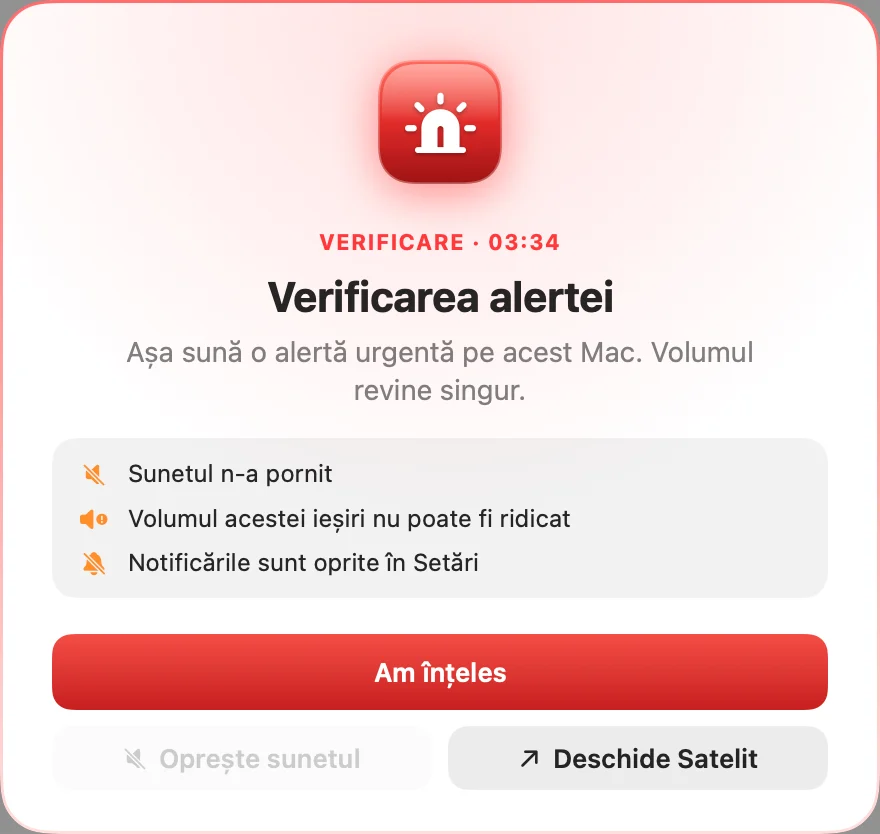
- shows the alert window above everything, on every screen, with Got It, Stop Sound and Open Satelit.
The window also says what did not work on this Mac, for example that the volume cannot be raised or that notifications are turned off.
To see how it sounds, choose Check the Alert from the menu bar or from Settings → Notifications. The test lasts 5 seconds.
Which widgets does the Mac have?
Satelit puts all widget types on the Mac, in Notification Center, and from macOS 14 also on the desktop. Besides them, the Mac has three widgets of its own: “Satelit AI”, “Mac control” and “Notifications”. Details in Widgets and complications.
What else does the app do?
- Handoff: a page open on the Mac continues on the iPhone and the other way round.
- Music: the Satelit player appears in Now Playing and works with the media keys, with AirPlay and with picture in picture for films.
- Downloads: files go to the Downloads folder, and macOS checks them before they are first opened.
- Start at login: the Mac App Store version asks you only once, at the first start. It does not start by itself without your consent.
The Mac App Store version has neither Satelit Crypto, Meet nor control of the Mac from the phone.
If something goes wrong
I do not get notifications on my Mac
Turn notifications on with the switch on the Notifications page in Satelit; macOS asks once. If you refused them, open System Settings → Notifications → Satelit. While a Satelit window is in front, notifications do not appear: you see them on the page.
The alert does not sound or does not get past Focus
Click Check the Alert. The test window says what is missing: the sound, the output volume or notifications turned off in Settings.
⌥⌘S does not open the panel
Another app may be using the same shortcut. Choose another one in Settings → Computer.
Satelit does not start with the Mac
macOS asks for approval: System Settings → General → Login Items. Turn Satelit on there.
The Satelit AI panel says to sign in
Click “Sign In to Satelit” and sign in in the main window.
Frequently asked questions
Which Macs does Satelit work on?
Satelit works on macOS 13 Ventura and newer. The app is universal: it runs natively on Macs with Apple silicon and on Macs with an Intel processor.
Do I get alerts if I close the Satelit window?
Yes, while the app is running. When you close the last window, Satelit stays in the menu bar, and notifications and urgent alerts keep coming. The app quits only with Command-Q.
Can I change the ⌥⌘S shortcut?
Yes. The Satelit AI shortcut is changed in Settings → Computer.
Can the Mac be controlled from the phone?
Not in the Mac App Store version. The Mac App Store sandbox rules do not allow control of the mouse, the keyboard and other apps.
Can I buy a plan in the Mac app?
Not in the Mac App Store version: it has no payment button and shows no prices. A plan bought on the web also works on the Mac.
Read next
- Satelit for iPhone and iPadWhat the Satelit app does on iPhone and iPad: alerts that get past silent mode, Siri, widgets, Apple Health, a list that opens in the store.
- Widgets and complicationsHow to add Satelit widgets on iPhone, iPad, Android, Mac and Windows and complications on Apple Watch, what each shows and how amounts stay hidden.
- Satelit for WindowsWhat the Satelit app does on Windows: the system tray, the Win+J keys, waking to “Satelit”, the widgets and controlling the PC from your phone.