Widgets and complications
In short
Satelit widgets show the cards from Home right on your phone's screen, on Mac or on Windows: the weather, drones, exchange rates, the list, budgets and more. You add them from the system's widget gallery, then choose the type. The family's amounts are hidden by default and appear as “•••• lei”.
What are Satelit widgets?
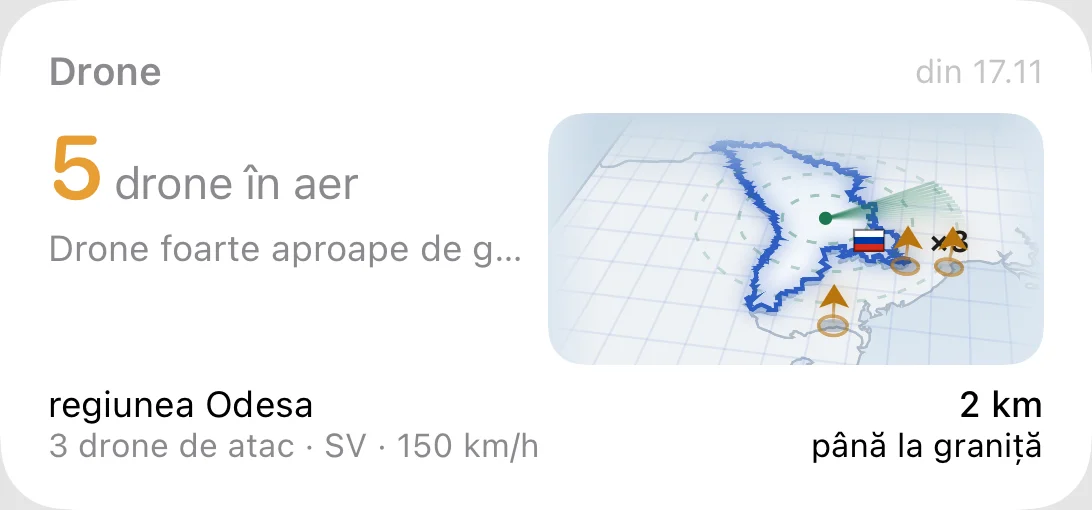
Satelit widgets are the cards from Home, placed right on your device's screen. You see the weather, drones, exchange rates, the shopping list, budgets or the day in Health without opening the app. Tapping a widget opens its page in Satelit.
Satelit has widgets on iPhone and iPad, on Android, on Mac and on Windows, plus complications on Apple Watch. The data comes from the Satelit app: a widget asks nothing from the internet by itself. That is why you should open the app once after installing it and sign in.
How do you add a widget on iPhone and iPad?
The steps are in the guide above. A few things to know:
- On iOS 17 and later, you have a single “Satelit” widget per size, and you choose the type in its settings, from the list of all types.
- On iOS 16, the widget shows the type last chosen in the app; until then it shows the weather.
- Sizes: small, medium, large and, on iPad, extra large.
- On the lock screen: inline, circular and rectangular. In StandBy (iOS 17) the small widget appears.
- The “Satelit AI” widget, circular or small, opens Satelit AI ready to listen.
What do the buttons on a widget do?
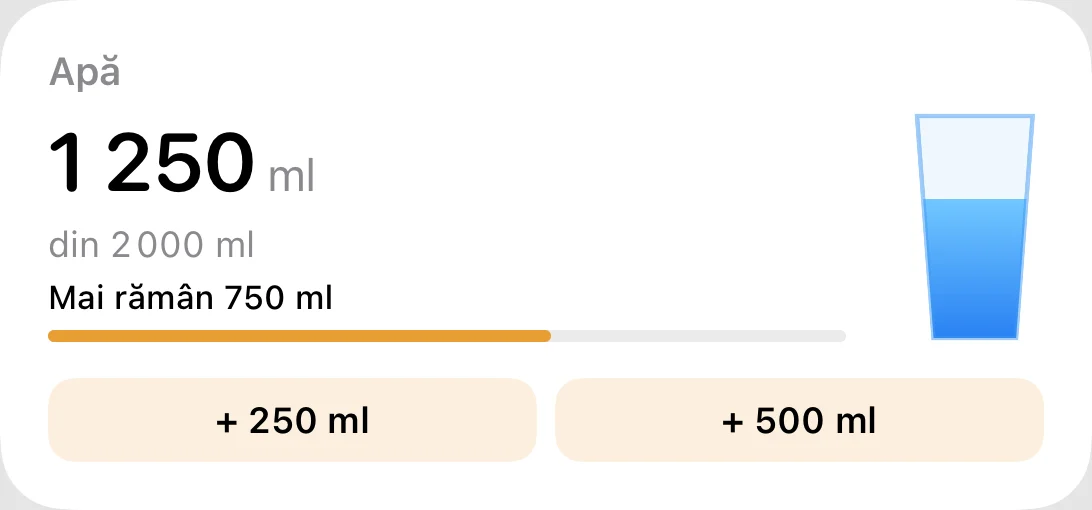
Some cards have buttons: water has “+ 250 ml”, the calendar “Add”, Health “+”. The medium widget fits at most 2 buttons, the large one at most 4. A button opens Satelit at its page, and you confirm there.
The music player has back, play or pause, and forward buttons. On iOS 17 they work right from the widget. On iOS 16 the widget opens the player.
How do you add a widget on Android?
On Android each widget type appears separately in the launcher's gallery.
- Touch and hold an empty spot on the home screen.
- Choose Widgets and look for Satelit.
- Drag the type you want onto the screen.
Widgets follow the phone's light or dark theme. Widgets with the family's money have “Show amounts on the home screen” in their settings, off by default. With the phone locked, amounts are hidden anyway.
How do you add a widget on Mac?
On Mac, Satelit widgets live in Notification Centre and, from macOS 14, on the desktop too.
- Right-click the desktop and choose Edit Widgets (on macOS 13, open Notification Centre).
- Search for Satelit.
- Choose the type and the size: small, medium, large or extra large.
On macOS 14 you also have the “Satelit” widget, whose type you choose in its settings, with the “Show amounts” option. The Mac also has three widgets of its own: “Satelit AI” (with Talk and Write), “Mac control” and “Notifications”. See Satelit for Mac.
What widgets does Windows have?
On Windows 11, the Satelit for Windows app puts the cards in the system's Widgets board, in small, medium and large sizes. Cards with the family's money do not appear there: anyone sitting at the computer can see the board. When you are not signed in, the board shows a single card: “Sign in to Satelit”.
How do you add a complication on Apple Watch?
Satelit complications come from the app on the iPhone.
- Touch and hold the watch face and choose Edit.
- Go to complications and tap a slot.
- Choose Satelit and the kind: “Satelit”, “Weather”, “Drones”, “Earthquakes” or “Exchange rate”.
The “Satelit” complication shows the first card, alerts first. The circular one shows a ring: drones out of 10, magnitude out of 7, war risk out of 100. On watchOS 10 the same complications also appear in the Smart Stack. Details in Satelit on Apple Watch.

How do amounts and health stay private?
- The family's amounts appear as “•••• lei” by default, without a single digit. The shape stays: the month's line, the share of the budget.
- On iPhone, even if you choose to see amounts, iOS hides them while the phone is locked and in locked StandBy.
- On Apple Watch amounts are always hidden.
- Health cards show only their neutral face on the lock screen.
- Public prices (fuel, exchange rates, discounts) are nobody's money and stay visible.
- When you sign out, your widgets' data is deleted.
If something goes wrong
The widget says “Open Satelit once to show data”
Open the Satelit app and sign in. The widget fills in after the app sends the data.
The widget says “Sign in to Satelit”
You are not signed in to the app on this device. Sign in, then wait a few seconds.
The widget's data is old
Open the Satelit app: it sends new data to all widgets. On iPhone, iOS decides background updates based on how you use the phone.
I cannot find the type I want in the list
The App Store and Mac App Store versions do not have the Satelit Crypto and Meet types. A widget placed earlier with such a type appears empty.
Frequently asked questions
Why does my widget show “Open Satelit once to show data”?
The widget has no data yet. Open the Satelit app and sign in; the widget fills in within a few seconds.
Are the family's amounts visible on the widget?
Not by default. Amounts appear as “•••• lei”. On Android and Mac you can show them in the widget's settings, and with the screen locked they are hidden anyway.
How often does a widget update?
The widget gets new data from the Satelit app, and on iPhone and Android it redraws at least every 30 minutes. On iPhone, iOS can wake the app in the background to refresh them; the phone decides exactly when.
Can I put Satelit on the iPhone's lock screen?
Yes. On the lock screen Satelit has inline, circular and rectangular widgets. On iOS 17, in StandBy mode, the small widget appears.
What complications does Satelit have on Apple Watch?
Satelit has complications for every shape on the watch face: circular, corner, rectangular and inline. They show the first card, the weather, drones, earthquakes or the exchange rate, as you choose.
Can the app put a widget on the screen by itself?
On Android, Satelit can ask the launcher to add a widget, and you confirm. On iPhone it cannot: iOS does not let any app place a widget by itself.
Read next
- Satelit for iPhone and iPadWhat the Satelit app does on iPhone and iPad: alerts that get past silent mode, Siri, widgets, Apple Health, a list that opens in the store.
- Satelit for Android and Wear OSWhat the Satelit app does on an Android phone and a Wear OS watch: widgets, emergency alerts, waking to “Satelit”, the phone's assistant.
- Satelit for MacWhat Satelit for Mac does: the menu bar, the Satelit AI panel with ⌥⌘S, urgent alerts above every window, widgets and keyboard shortcuts.
- Satelit on Apple WatchHow Satelit works on Apple Watch: the cards sent by the iPhone, complications on the watch face, Smart Stack, and earthquake and drone alerts on your wrist.