Exporting your data and deleting your account
In short
You can download your data at any time from Settings → Privacy and data, with “Export JSON”. You delete the account in the same place, with “Delete account”, after confirming with your password or email address. Deletion is permanent: the account, the sessions, your files and the families left without members disappear, while families where other people remain keep their data.
How do I download my data from Satelit?
You can download your data at any time, as a JSON file, from Settings → Privacy and data.
- Open Settings → Privacy and data.
- Under Your data, tap Export JSON.
- The browser downloads a file named
satelit-export-followed by the day's date, for examplesatelit-export-2026-11-27.json. - You see the message “Export downloaded.”
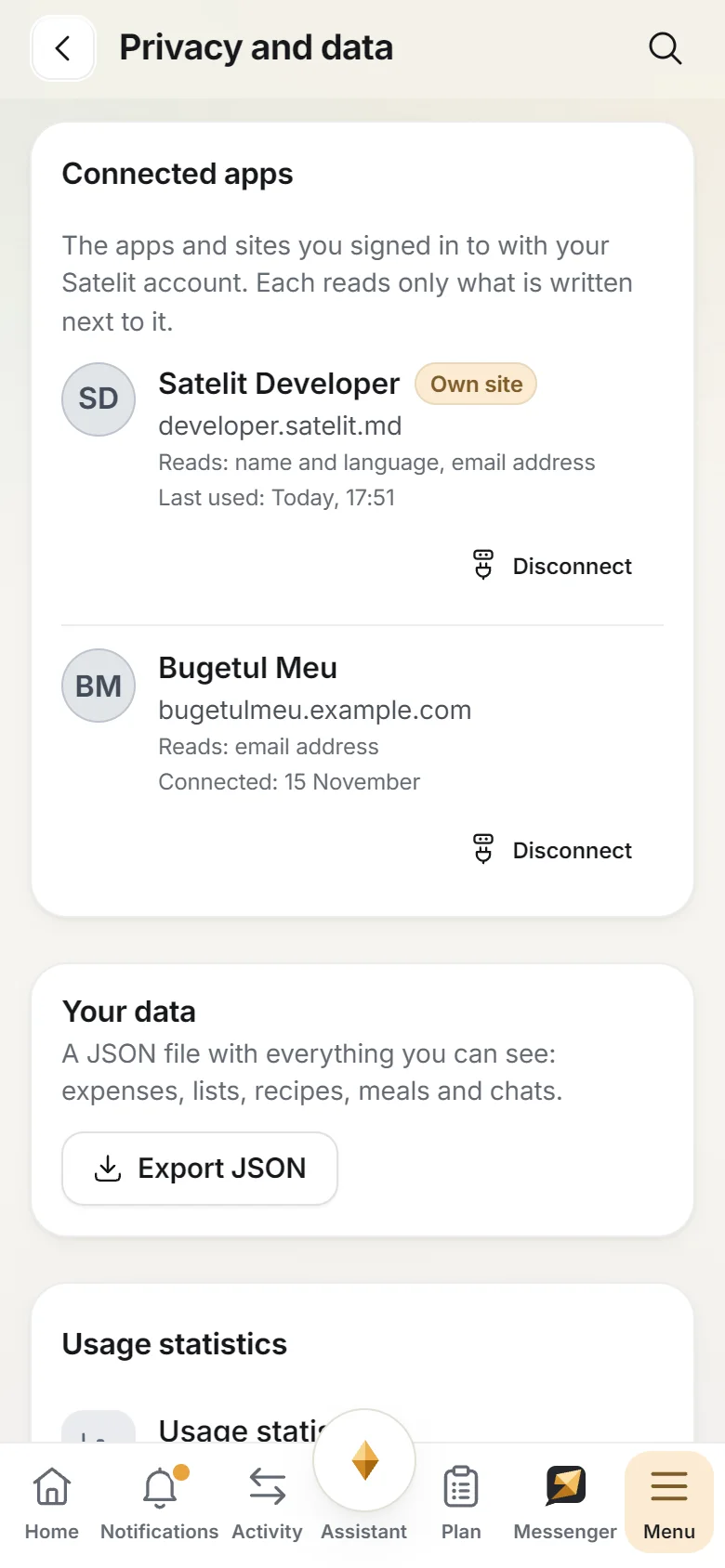
The file includes everything you see in Satelit: your account data, connected accounts, discount cards, shared lists, the social part and, for each family, the spending, lists, recipes, meals and conversations you can see. The export respects your role. If you see only your own transactions, only those go into the file.
The export needs internet.
Can I export my spending as a spreadsheet?
Yes. Besides the full export, you can download a family's transactions as an XLSX or CSV spreadsheet, if your role allows export.
- Open Transactions.
- Tap Export.
- Choose the period and the Format, then tap Download.
The file includes the transactions you see in that space: the date, the type, the amount, the currency, the category, the merchant, the note, the wallet, who paid and who recorded it.
Exports made by the assistant in a conversation are kept for 30 days. You can ask for them again at any time.
How do I delete my account?
You delete the account from Settings → Privacy and data, under Delete account.
- First download your data with Export JSON, if you want to keep it.
- Under Delete account, tap the Delete account button.
- Read the warning: “You are permanently deleting … This can't be undone.”
- Enter the password under Password, to confirm. If you sign in only with Google, Apple, Facebook or Telegram and have no password, enter the account's address under Type the account's address to confirm.
- Tap Delete permanently.
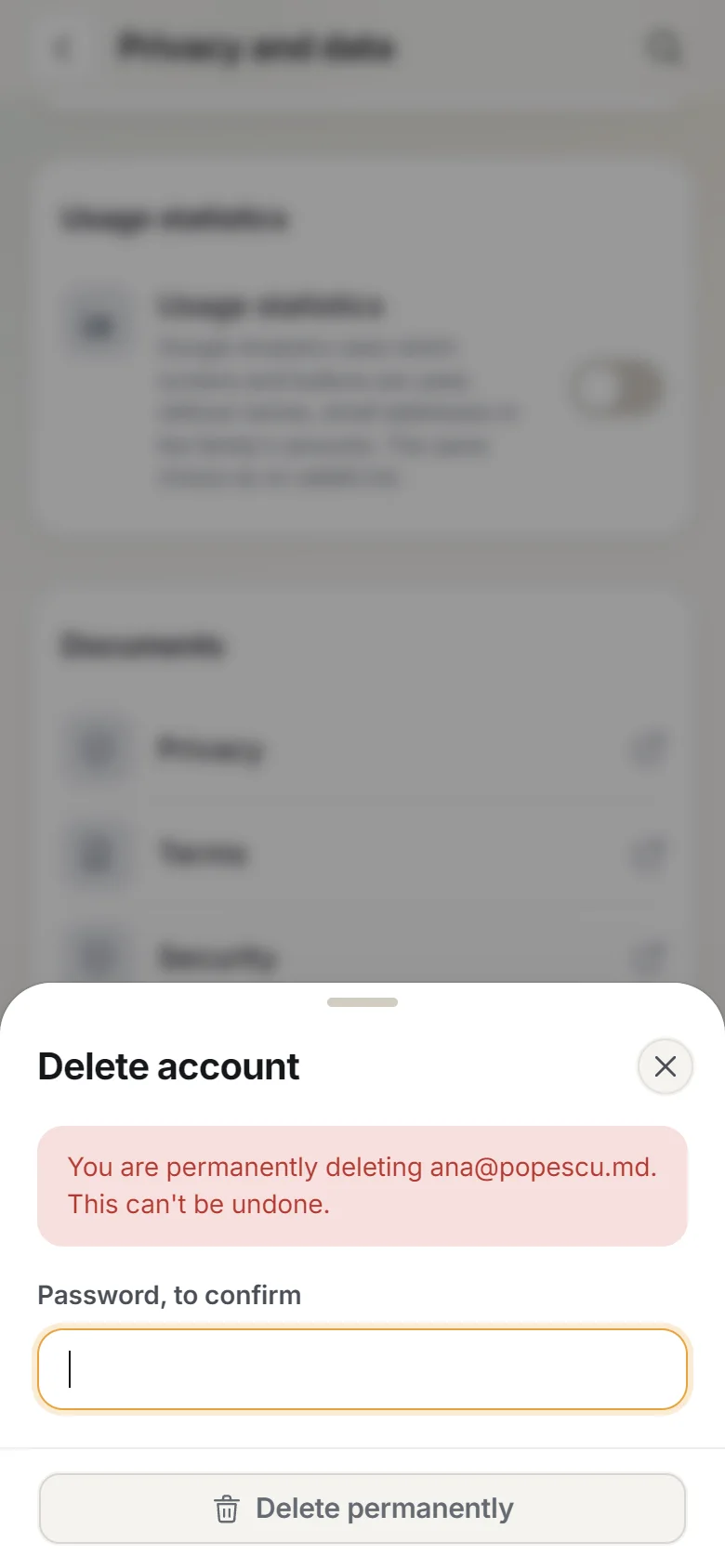
The account is deleted at once. The app then removes everything related to the account from the device and takes you to the sign-in page. Deletion needs internet.
What is deleted when I delete my account?
Deleting the account removes, in the same operation:
- the account, all sessions and connected accounts (Google, Apple, Facebook, Telegram);
- access granted by Google: Satelit also revokes it at Google;
- the files you uploaded, in all families: photos, receipts, statements, documents;
- your visits to shops, discount cards, what you told the assistant by voice;
- your listings, your reviews and their photos;
- your profile picture, your Messenger Satelit profile, files sent in messages, your Meet profile;
- your Health cards and their files;
- the computers linked to the account.
File links stop working the moment the account is deleted. The files themselves are deleted right after that, and if the storage does not respond, the deletion is retried every hour until it succeeds.
What happens to my families?
What happens to a family depends on who remains in it:
| Your situation in the family | What happens |
|---|---|
| You are the only member | The family is deleted with all its data and files. |
| You are the only owner, but there are other members | The family remains and passes to the member who joined it first. |
| There is another owner or you are not an owner | Only you leave the family. |
A family that remains keeps its data. For example, an expense of 1,250.00 MDL you recorded stays in the family, with its amount, but without the receipt photo you uploaded.
If you just want to stop seeing a family, you do not need to delete your account: on the Family screen, tap Leave family. Leaving deletes nothing, and your files stay in the family.
Does my data stay in backups?
For a while, yes. The database has encrypted backups, made every few hours, daily and monthly. A backup made before the deletion is not changed afterwards. Old backups are gradually replaced, and the oldest monthly backup is kept for at most 12 months.
If something goes wrong
It says the password is wrong
Enter the password you use to sign in to Satelit, not your Google or Facebook password. If you have forgotten it, use Forgot your password? on the sign-in page, then try again.
I have no password and do not know what to enter
Enter the account's email address, exactly as it appears in the warning.
“This needs an internet connection.” appears
Export and account deletion need a connection. Connect to the internet and try again.
The export does not download
Check that the browser allows downloads for app.satelit.md. On the phone, look for the file in the downloads folder.
My family remained after the deletion
The family passed to another member, because there were still people in it. Its data stays with them.
Frequently asked questions
Can I undo deleting my account?
No. Deletion is permanent and cannot be undone. Download your data first, with “Export JSON”.
What happens to my family if I delete my account?
A family where you are the only member is deleted with all its data. A family where other members remain carries on, with its spending, lists and recipes.
What does the JSON export contain?
Everything you see in Satelit: your account data, spending, lists, recipes, meals, the conversations you can see, discount cards and your social part.
Is my Satelit account deleted if I remove Satelit from my Apple account?
No. Apple only disconnects Satelit from your Apple ID; the Satelit account and its data remain. You delete the account only from Settings.
Can I just leave a family without deleting my account?
Yes. When you leave the family you no longer see its data, and your account remains. The files you uploaded stay in the family.
Can I export my spending as a spreadsheet?
Yes, if your role allows export: in Transactions, tap “Export” and choose the XLSX or CSV format.
Read next
- Privacy and securityHow Satelit protects shop passwords, requests between the app and the server, and your account: who sees what in the family, devices, 2FA, passkeys.
- Getting started with SatelitWhat Satelit is, how to create an account, sign in with email, Google, Apple, Facebook, Telegram or a passkey, and what to do after you first sign in.
- Satelit without internetWhat you can do in Satelit without internet, how expenses and lists added offline are saved and how they go to the server once the network is back.