Satelit on Apple Watch
In short
Satelit on Apple Watch shows you the Home cards on your watch, sent by the Satelit app on your iPhone: the weather, drones, earthquakes, the exchange rate, the list and more. You put Satelit complications on the watch face, and emergency alerts reach your wrist. The watch needs Satelit on the iPhone, signed in.
What does Satelit do on Apple Watch?
Satelit on Apple Watch shows you the Home cards on your watch and brings emergency alerts to your wrist. The watch app comes together with Satelit for iPhone. It works from watchOS 9.
The watch does not connect to Satelit on its own. The phone prepares the cards and sends them to the watch. That is why you need Satelit on iPhone, signed in.
Which cards appear on the watch?
At most 12 cards appear on the watch. The iPhone chooses them like this:
- first, the widget types you have on the iPhone's home screen;
- then the ones useful on a watch: drones, earthquakes, war risk, the weather, the exchange rate, fuel, the list, the calendar and the month's expenses.
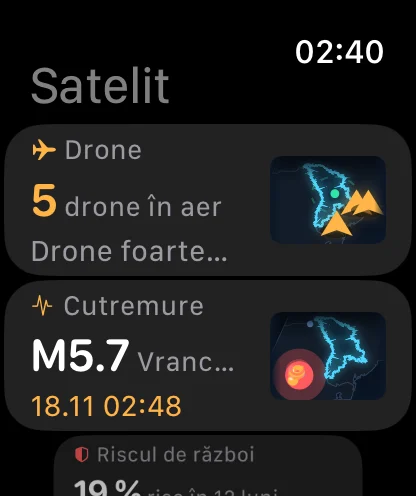
Each card in the list shows the type's symbol, the title, the number with its unit and a short note. Drones and earthquakes have a small map of Moldova beside them.
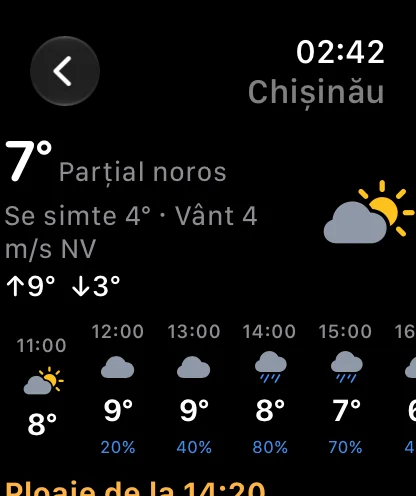
Tap a card to open it. You see the large number, the map, the hours, the rain and the rows with details.
How does the data reach the watch?
The iPhone sends a new package of cards after the Satelit app updates its data. The system delivers it to the watch when it can. If the watch opens with no cards or with a package older than 15 minutes, it asks the phone for a new one.
The watch keeps the last package, so you see the cards even without the phone nearby. Below the list it says how old they are.
What do the buttons on a card do?
Some cards have buttons, for example water and the calendar. A button opens its page in Satelit on the iPhone.
- When the phone is near, the card says “Waiting in Satelit on the iPhone”.
- When the phone is not near, the card says “The iPhone is not near. It opens when they connect.”
What are Satelit complications?
A complication is a small element on the watch face. Satelit has complications for every shape on the face: circular, corner, rectangular and inline. On watchOS 10 they also appear in Smart Stack.
You choose what the complication shows:
- “Satelit”: the first card in the package; alerts come first, then the weather and the exchange rate.
- “Weather”: the current temperature and sky.
- “Drones”: drones in the air near Moldova.
- “Earthquakes”: the last earthquake felt.
- “Exchange rate”: the official leu exchange rate.
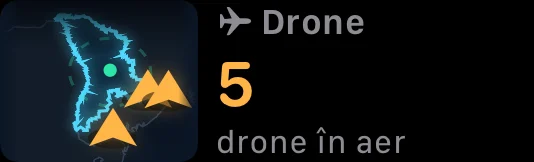
The circular complication shows a ring: drones out of 10, magnitude out of 7, war risk out of 100. The rectangular one puts drones and earthquakes on a small map of Moldova. The steps to add one are above, in the guide.
How do alerts reach the watch?
Satelit notifications from the iPhone appear on the watch through the iPhone's usual mirroring, only once.
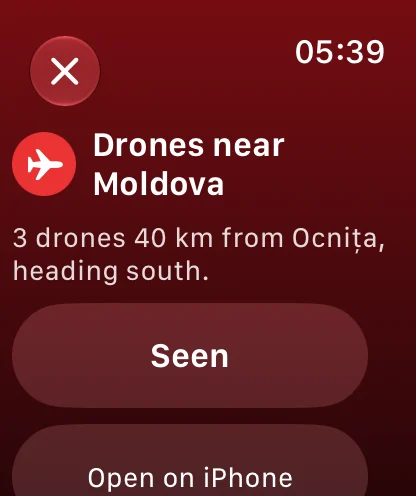
When the Satelit app is open on the watch, an emergency alert (earthquake, drones, smoke or a water leak at home) fills the whole screen. You see the title, the text and two buttons: “Seen” and “Open on iPhone”. When the package has the map of drones or earthquakes, it appears below the buttons. The vibration repeats until you touch the screen, for at most 60 seconds.
What stays private on the watch?
People around you can also see the watch screen, so:
- the family's amounts are always hidden on the watch;
- cards from Health appear as on a locked phone: only the neutral face of sensitive data;
- when you sign out on the iPhone, the watch no longer keeps any of your data.
What does Satelit not yet do on the watch?
- Siri remains the watch's assistant. watchOS does not allow another assistant.
- The watch's own Satelit voice is not ready.
- watchOS has no tiles like Wear OS. Smart Stack takes their place.
If something goes wrong
The watch says “Open Satelit on your iPhone and sign in”
You are not signed in on the iPhone. Open Satelit on the iPhone, sign in, then open the app on the watch again.
The watch says “Open Satelit on your iPhone once to bring the cards here”
The watch has not yet received any package. Open Satelit on the iPhone, keep the phone near the watch and wait a few seconds.
The cards on the watch are old
Below the list you see their age. Open Satelit on the iPhone, so it updates its data, and keep the watch near. The watch asks for a new package by itself when its own is older than 15 minutes.
A Home card is missing from the watch
At most 12 cards fit on the watch. Put the widget of that type on the iPhone's home screen: the types there come first. See Widgets and complications.
Frequently asked questions
Does Satelit work on Apple Watch without the iPhone?
The watch shows the last cards it received and their age, even without the iPhone nearby. New cards come only from the Satelit app on the iPhone.
From which watchOS version does Satelit work?
Satelit works from watchOS 9. Smart Stack needs watchOS 10.
Can the family's money be seen on the watch?
No. On the watch, the family's amounts are always hidden, because others can also see the watch screen.
Can I talk to Satelit AI from the watch?
Not yet. The watch's own Satelit voice is not ready, and Siri remains the watch's assistant.
How long does an alert ring on the watch?
With the Satelit app open on the watch, the vibration of an emergency alert repeats until you tap it, for at most 60 seconds. Otherwise, the watch shows the iPhone's notification with its usual vibration.
Read next
- Satelit for iPhone and iPadWhat the Satelit app does on iPhone and iPad: alerts that get past silent mode, Siri, widgets, Apple Health, a list that opens in the store.
- Widgets and complicationsHow to add Satelit widgets on iPhone, iPad, Android, Mac and Windows and complications on Apple Watch, what each shows and how amounts stay hidden.
- Health: the family's health dataWhat Health keeps in Satelit, how to connect Apple Health or Health Connect, how to share a card with family or a doctor and how data is protected.